
Hands-on with Amazon’s Alexa Tablet 12 Pro and its wild new matte display
Amazon's Fire tablets are notable for being dirt cheap. While they're great for kids, they don't offer a premium Android tablet experience. The company's new $499 Alexa Tablet 12 Pro is an attempt to build a device someone might actually want to use. It's one of a few new Android tablets Amazon announced today, and […]
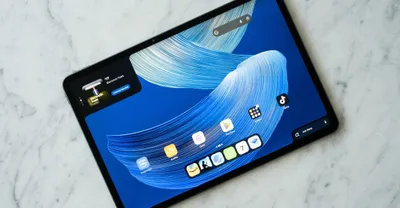
Amazon’s Fire tablets are notable for being dirt cheap. While they’re great for kids, they don’t offer a premium Android tablet experience. The company’s new $499 Alexa Tablet 12 Pro is an attempt to build a device someone might actually want to use. It’s one of a few new Android tablets Amazon announced today, and it’s the one you need to know about. Unlike the Fire Tablet lineup, the Alexa Tablet doesn’t run some hobbled version of Android stuck with Amazon’s app store with ads for Amazon services at every turn.
It has full access to the Google Play app store. It’s powered by 8GB or 12GB of RAM with a MediaTek Dimensity 8400 8-core CPU. That’s more than enough for light gaming, powering Alexa, and running basic apps, but don’t expect Alien: Isolation to run super smoothly. The aluminum unibody feels great. It’s light at 550 grams (1.2 pounds), but not flimsy. It’s slightly lighter than the 13-inch iPad Air (617 grams) but heavier than the 11-inch (465 grams).
The screen is the truly exciting thing about the Alexa Tablet 12 Pro. The Alexa Tablet 12 Pro has a 12.3-inch 3:2 display that can be configured with Corning’s Nanomatte tech, similar to Apple’s nano-texture, which reduces glare and gives the screen a more paper-like feel. It’s impossible to do it justice in photos or video. The Nanomatte coating doesn’t simply reduce glare; it almost completely eliminates it. Amazon held a briefing in a brightly sunlit room, and I thought the 12 Pro was a dummy unit when I first saw it.
It looked like a cardboard placeholder image was placed inside. Then an Amazon rep started swiping around the screen. [Image: The difference between the Nanomatte display and the standard glossy one is dramatic. https://platform.theverge.com/wp-content/uploads/sites/2/2026/10/268799_AlexaTablet12Pro_10.jpg? quality=90&strip=all] There’s also a standard glossy option, and the difference is shocking. In the bright sunlight of the room, the glossy screen was basically a mirror and was easily washed out when viewed at an angle.
The Nanomatte display, however, was clearly readable at any angle and barely reflected any ambient light. Only at extreme angles in the brightest patches of light did it become difficult to see. The screen pairs particularly well with the immersive Kindle mode. Here, background activities are limited, notifications are silenced, and blue light is lowered to reduce eye strain. There are three different Kindle-specific display modes.
Standard delivers the full vibrancy of the screen; Color offers a softer, more muted experience; and Ink is full grayscale. In Kindle mode, battery life is also extended from 16 hours to 20 hours. Without having the two side-by-side, it’s hard to say how it compares to Apple’s matte display on the iPad Pro, but anecdotally it seems to retain slightly more contrast. Using a stylus with it is much more pleasant than on a glossy display, but I can’t say I noticed a difference between it and an iPad.
The Alexa Tablet Pro Pen and Pro Keyboard attach magnetically and seem serviceable enough. I wouldn’t want to type on its shallow, cramped keys all day, but they’re fine for knocking out a few emails. The keyboard case was a little clunky to get on and off, though. It’s actually two parts — the back cover and stand are separate from the keyboard base. Alexa Everywhere [Image: Go ahead, ask Alexa. I dare you. I double dare you. https://platform.theverge.com/wp-content/uploads/sites/2/2026/10/268799_AlexaTablet12Pro_5.jpg?
quality=90&strip=all] The tablet shoves Alexa down your throat at every turn. In the bottom right-hand corner is an “Ask Alexa” bar that lets you quickly chat with the AI assistant. And in the top left-hand corner is what Amazon calls the Dynamic Tab. It offers up proactive suggestions from Alexa. That can be something as simple as picking up where you left off in a book or movie, or offering an itinerary for a three-day trip to New York.
This is, of course, powered by Amazon’s deep well of information it gathers from your reading, viewing, and shopping habits. Amazon keeps some of Alexa’s more invasive features off by default. On-Screen Intelligence, which can see what you’re doing and take actions based on what’s actually on your screen, is strictly opt-in. There are also robust controls for limiting what Alexa can hear and remember. If you do opt in, though, Alexa becomes a pretty powerful shopping companion.
I was able to open random photos from the internet and ask Alexa to find me something in them, like a coffee table or a mirror, and, even if it couldn’t track down the exact thing, it found something close. Then it would add it to my Amazon cart if I asked. How likely am I to ask Alexa to track down a bathroom fixture for me from a Pinterest photo and deliver it to my house in two days via Prime? Not very. I’m also unlikely to have it automatically add school holidays to my calendar from the Department of Education site, but it will if you ask it to.
[Image: https://platform.theverge.com/wp-content/uploads/sites/2/2026/10/268799_AlexaTablet12Pro_1.jpg? quality=90&strip=all] [Image: https://platform.theverge.com/wp-content/uploads/sites/2/2026/10/268799_AlexaTablet12Pro_5.jpg? quality=90&strip=all] [Image: https://platform.theverge.com/wp-content/uploads/sites/2/2026/10/268799_AlexaTablet12Pro_2.jpg? quality=90&strip=all] [Image: https://platform.theverge.com/wp-content/uploads/sites/2/2026/10/268799_AlexaTablet12Pro_6.jpg?
quality=90&strip=all] [Image: https://platform.theverge.com/wp-content/uploads/sites/2/2026/10/268799_AlexaTablet12Pro_8.jpg? quality=90&strip=all] [Image: https://platform.theverge.com/wp-content/uploads/sites/2/2026/10/268799_AlexaTablet12Pro_4.jpg? quality=90&strip=all] [Image: https://platform.theverge.com/wp-content/uploads/sites/2/2026/10/268799_AlexaTablet12Pro_9.jpg? quality=90&strip=all] [Image: https://platform.theverge.com/wp-content/uploads/sites/2/2026/10/268799_AlexaTablet12Pro_10.jpg?
quality=90&strip=all] [Image: https://platform.theverge.com/wp-content/uploads/sites/2/2026/10/268799_AlexaTablet12Pro_3.jpg? quality=90&strip=all] [Image: https://platform.theverge.com/wp-content/uploads/sites/2/2026/10/268799_AlexaTablet12Pro_7.jpg? quality=90&strip=all] The Alex Tablet 12 Pro starts at $499.99, but you’ll have to shell out at least $549.99 for the Nanomatte model. If you want to tack on the keyboard case and the Pro Pen, that will be an additional $149.99 and $89.99, respectively.
Amazon also announced two smaller models that lack the Nanomatte screen options. The Alexa Tablet 11 starts at $329.99, while the Alexa Tablet 8 starts at $229.99. Those come in more fun colorways, including rosette and matcha, in addition to the drab but functional graphite of the Tablet 12 Pro.