
Apple Pay launches in India, initially with Axis Bank Card support; here's how to set it up and use
After months of rumours, Apple on Wednesday (September 30), officially launched much awaited Apple Pay, a secure digital wallet and mobile payment service in India. Apple Pay is now available to users in India with iPhone, iPad, and Apple Watch devices, with support for Mac coming later this year.
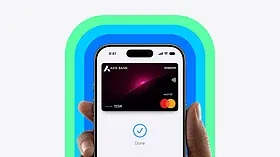
After months of rumours, Apple on Wednesday (September 30), officially launched much awaited Apple Pay, a secure digital wallet and mobile payment service in India.
Apple Pay is now available to users in India with iPhone, iPad, and Apple Watch devices, with support for Mac coming later this year.
Quick summary - click for full details
Concise summary of key highlights
Apple Pay launches in India, initially with Axis Bank, Visa, Mastercard support
In one line
Apple Pay officially launches in India, starting with Axis Bank, Visa, and Mastercard support across major retailers and apps.
Key highlights
• Initial launch partners
Apple Pay is initially available in India with support for Axis Bank-issued Visa and Mastercard credit cards.
• Future UPI integration
Support for the Unified Payment Interface (UPI) is not included at launch but will be enabled in the coming months following statutory approvals.
• Supported devices and merchants
The service is available on iPhone, iPad, and Apple Watch, with Mac support later this year, accepted by numerous popular merchants and quick-commerce apps.
• Simple card setup process
Users can easily add eligible cards directly via the Axis Bank app or through the Apple Wallet app on their devices.
Key statistics
September 30
Launch date
More than 80 per cent
UPI digital cash transfer market share
Processed with AI. Reviewed by DH Digital Team.
“India is home to a dynamic and digitally savvy population that continues to embrace a cashless future while expecting the highest standards of security and privacy, and we’re so excited to bring Apple Pay to users in India today. Apple Pay makes everyday payments with a card easy, secure, and private — from simply tapping to pay in stores without an extra app, PIN, or OTP to checking out online without repeatedly entering payment information,” said Jennifer Bailey, Apple’s vice president of Apple Pay and Apple Wallet.
Apple Pay does not support Unfied Payment Interface (UPI) developed by National Payments Corporation of India (NCPI) and also RuPay card yet. But, will be enabled in the coming months, after getting statutory approvals from the regulatory agencies.
Want to buy an iPhone 18 Pro at discount? Beware, you might lose more than just your money
With this, Apple Pay will be competing with the PhonePe, Google Pay, and Amazon Pay, which run on UPI. The latter accounts for more than 80 per cent of digital cash transfer methods, as it supports multiple avenues to exchange money such as QR codes, phone numbers and even Tap-and-Pay, which Apple Pay will support along with biometric facial and fingerprint-based authentication.
Apple Pay launched in India.
Initially, customers with Axis Bank-issued Visa and Mastercard credit cards can add their cards to Apple Pay. They use them at thousands of in-store and online merchants across India, as well as anywhere that accepts NFC (Near Field Communication)-based digital cash transactions.
Apple has worked closely with payment service providers (PSPs) — like Cashfree, JusPay, Mswipe, Paytm, PayU, Pine Labs, Razorpay, Worldline, and more — to bring Apple Pay to their merchant networks in India, with even more merchants and apps coming over time.
Apple Pay will be supported at all Apple Store locations (Bengaluru, Mumbai, Delhi, Noida, and Pune), and also on quick-commerce app Blinkit, and other outlets such as Chaayos, Comet, Croma, Interflora, Ixigo, Le15 Patisserie, Reliance brands, Tata 1mg, Zomato, and more.
When using Apple Pay at Apple outlets and other partner retail units, users will be entitled to earn the rewards and benefits offered by their cards.
Here's how to add a credit card to Apple Wallet and use Apple Pay:
Customers can add a card directly to Apple Wallet via the latest version of the Axis Bank app.
Alternatively, simply open the Wallet app on iPhone, tap the plus sign, and follow the steps to add an eligible card.
Once a user adds a card to their Apple device, they can start using Apple Pay right away.
Using Apple Pay in stores is seamless and easy.
Step 1: User has to take simply double-click the side button or Home button on their iPhone/Watch
Step 2: Then, user has to authenticate using Face ID, Touch ID, or a device passcode if prompted
Step 3: Then, hold the top of the iPhone or display of the Apple Watch near the contactless reader (Point-of-Sale machine) to pay. And, the transaction will get completed in a jiffy.
Google Pay gets conversational Gemini AI assistant in India
Get the latest news on new launches, gadget reviews, apps, cybersecurity, and more on personal technology only on DH Tech .